package SGN::View::Mason::Commands;
use strict;
use vars qw($m $c);
HTML::Mason::Component::FileBased->new(
'code' => sub {
use utf8; local $SGN::View::Mason::Commands::m = $HTML::Mason::Commands::m;
$m->debug_hook( $m->current_comp->path ) if ( HTML::Mason::Compiler::IN_PERL_DB() );
#line 4 "/home/production/cxgn/sgn/mason/qtl/search/help/index.mas"
$m->print( '
' );
#line 5 "/home/production/cxgn/sgn/mason/qtl/search/help/index.mas"
my $qtl_search_page = qq | QTL/Trait search |;
my $search_form = qq | 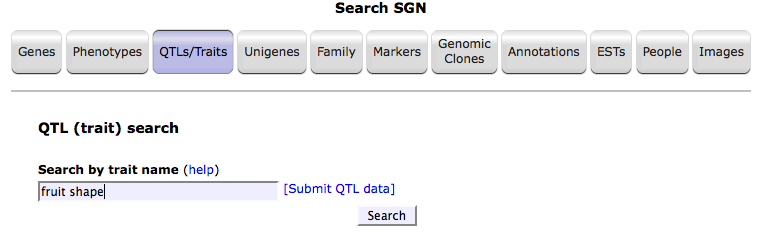 |;
my $search_result = qq |
|;
my $search_result = qq | 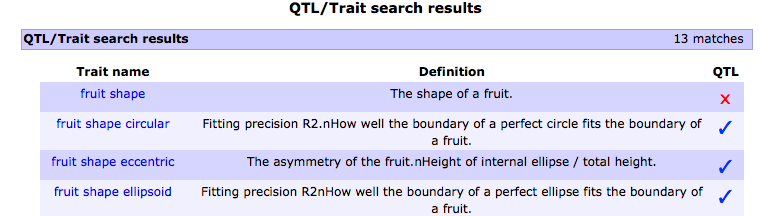 |;
my $pop_list = qq |
|;
my $pop_list = qq |  |;
my $qtl_genome = qq |
|;
my $qtl_genome = qq | 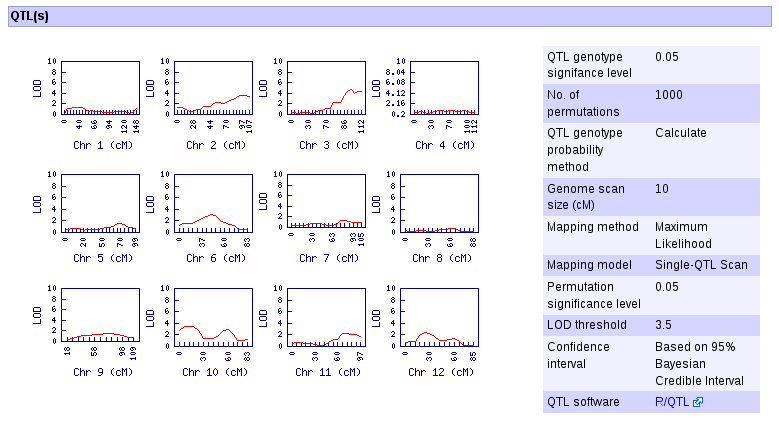 |;
my $qtl_detail = qq |
|;
my $qtl_detail = qq | 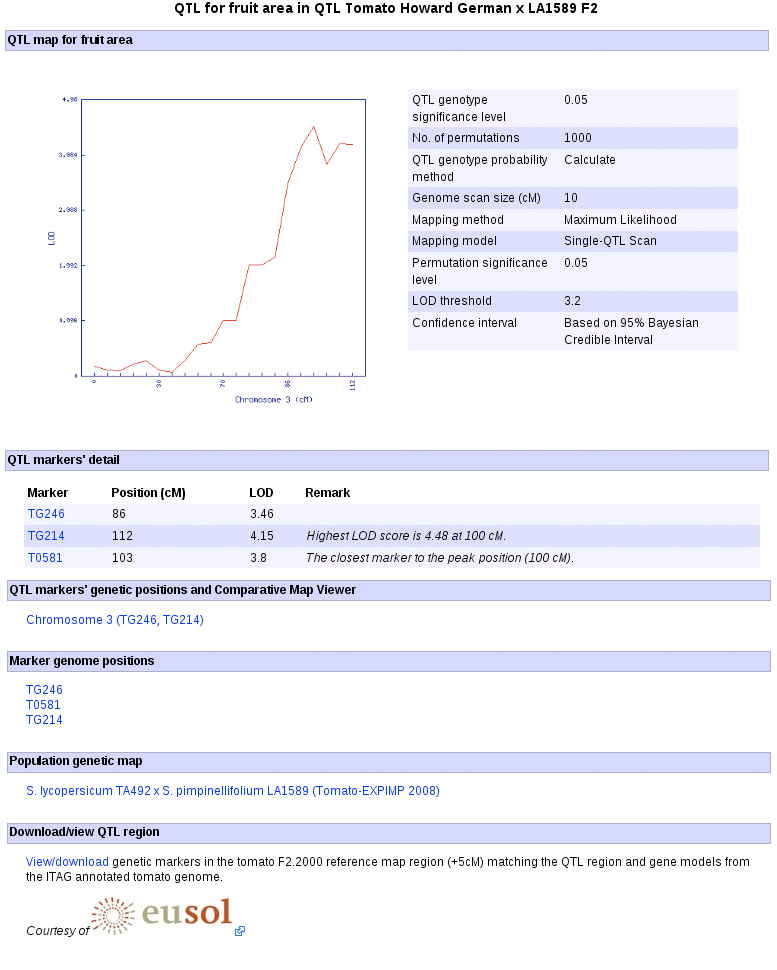 |;
my $chr_location = qq |
|;
my $chr_location = qq | 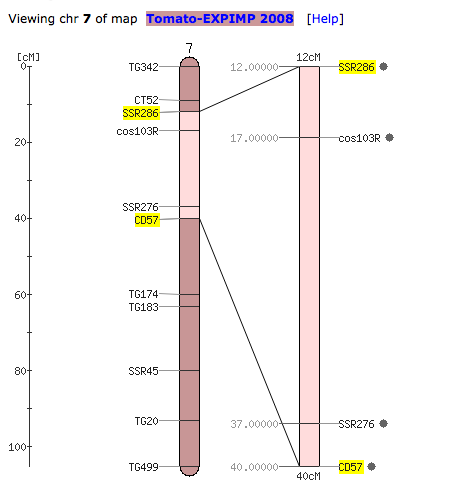 |;
my $cview_help = qq | |;
my $contact = qq | sgn-feedback\@solgenomics.net |;
#line 18 "/home/production/cxgn/sgn/mason/qtl/search/help/index.mas"
$m->print( '
' );
#line 19 "/home/production/cxgn/sgn/mason/qtl/search/help/index.mas"
$m->comp( '/page/page_title.mas',
title=>'QTL Search Page'
); #line 21 "/home/production/cxgn/sgn/mason/qtl/search/help/index.mas"
$m->print( '
|;
my $cview_help = qq | |;
my $contact = qq | sgn-feedback\@solgenomics.net |;
#line 18 "/home/production/cxgn/sgn/mason/qtl/search/help/index.mas"
$m->print( '
' );
#line 19 "/home/production/cxgn/sgn/mason/qtl/search/help/index.mas"
$m->comp( '/page/page_title.mas',
title=>'QTL Search Page'
); #line 21 "/home/production/cxgn/sgn/mason/qtl/search/help/index.mas"
$m->print( '
The ' );
#line 23 "/home/production/cxgn/sgn/mason/qtl/search/help/index.mas"
$m->print( $qtl_search_page );
#line 23 "/home/production/cxgn/sgn/mason/qtl/search/help/index.mas"
$m->print( ' returns phenotypic traits that may have qtl data.
QTL analysis is performed on the fly.
1. Search the database using a trait name. For example, \'fruit shape\'.
' );
#line 29 "/home/production/cxgn/sgn/mason/qtl/search/help/index.mas"
$m->print( $search_form );
#line 29 "/home/production/cxgn/sgn/mason/qtl/search/help/index.mas"
$m->print( '
2. Follow the link for the trait of your interest.
' );
#line 33 "/home/production/cxgn/sgn/mason/qtl/search/help/index.mas"
$m->print( $search_result );
#line 33 "/home/production/cxgn/sgn/mason/qtl/search/help/index.mas"
$m->print( '
3. After selecting the trait of your interest, for example the trait \'fruit shape circular\', you will be taken to the trait (cvterm) page, scroll down to the \'Phenotype data/QTL\' subsection. Select the population of interest for which the trait was evaluated. For example, the population \'Howard German x LA1589\'.
' );
#line 37 "/home/production/cxgn/sgn/mason/qtl/search/help/index.mas"
$m->print( $pop_list );
#line 37 "/home/production/cxgn/sgn/mason/qtl/search/help/index.mas"
$m->print( '
4. Visually determine which linkage group contains a QTL, see the LOD threshold in the legend. For example, chromosome 7 has a QTL. Click the linkage group of interest and on the new window, follow the link "Go to the QTL page...".
' );
#line 42 "/home/production/cxgn/sgn/mason/qtl/search/help/index.mas"
$m->print( $qtl_genome );
#line 42 "/home/production/cxgn/sgn/mason/qtl/search/help/index.mas"
$m->print( '
6. Clicking the "Go to the QTL page" generates the QTL detail page where among others the QTL confidence interval, links to the genome positions of the markers, marker detail pages, and SGN\'s Comparative Map Viewer are displayed.
' );
#line 46 "/home/production/cxgn/sgn/mason/qtl/search/help/index.mas"
$m->print( $qtl_detail );
#line 46 "/home/production/cxgn/sgn/mason/qtl/search/help/index.mas"
$m->print( '
7. The QTL detail page (shown above) presents cross-references from the QTL to other relevant genetic and genomic data and bioinformatic tools. Forexample, to view the genetic location of the QTL of a trait of interest and compare it to other genetic maps using the Comparative Map Viewer, click the linkage group link under the \'QTL markers\' genetic positions and Comparative Map Viewer\' subection.
QTL genetic location:
' );
#line 52 "/home/production/cxgn/sgn/mason/qtl/search/help/index.mas"
$m->print( $chr_location );
#line 52 "/home/production/cxgn/sgn/mason/qtl/search/help/index.mas"
$m->print( '
To learn on how to perform comparative analysis with genetic maps and physical maps of the same or different Solanaceae species, please read this ' );
#line 54 "/home/production/cxgn/sgn/mason/qtl/search/help/index.mas"
$m->print( $cview_help );
#line 54 "/home/production/cxgn/sgn/mason/qtl/search/help/index.mas"
$m->print( ' help document.
If you have questions, please contact us at: ' );
#line 57 "/home/production/cxgn/sgn/mason/qtl/search/help/index.mas"
$m->print( $contact );
#line 57 "/home/production/cxgn/sgn/mason/qtl/search/help/index.mas"
$m->print( '
' );
;return;
},
'load_time' => 1763201180,
)
;